Cut long footage without a transcript. Spend your time creating.
Looking for a Descript alternative for long footage? Kutmo needs no transcript: it drops the stretches where nothing moves and the silences, then delivers the cuts to Premiere, Final Cut or Resolve as a ready-to-edit timeline. It works on footage with no speech at all.
2 runs with no account · 5 more when you sign up · no card
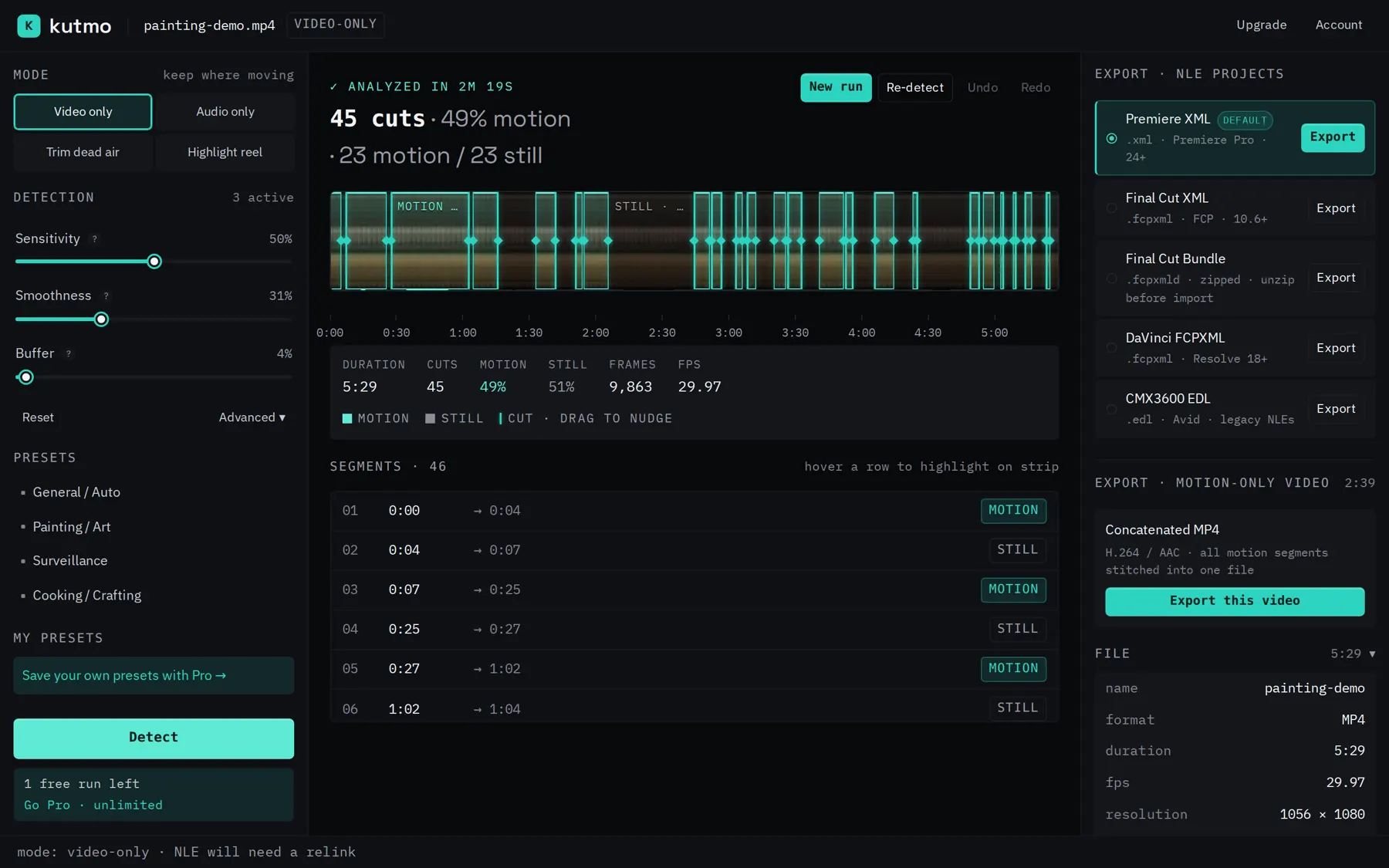
A real run: a 5:29 painting session, 45 cuts found, 2:39 of brushwork kept. The clip shows what Kutmo decided for each moment: kept while the brush moves, cut while the canvas sits still.
Cut long footage without a transcript
Works without speech
Kutmo reads the picture and the sound level, not words. Timelapses, gameplay, drone shots and silent screen recordings get cut just like interviews.
Your editor stays your editor
Kutmo makes the rough cut and hands it over as Premiere XML, FCPXML, DaVinci Resolve FCPXML or a CMX3600 EDL. You finish the edit in the tool you already use.
Hours of footage in one drop
Drop several long recordings at once. They are scanned one after another with the same settings, and can be exported as separate projects or one combined timeline.
From raw footage to a cut timeline in three steps
No scrubbing, no manual logging. About two minutes, start to finish.
Drop your video
Drag in a video or an editor XML. It decodes in the tab — nothing uploads.
Tune the detection
Sliders tune the detection. Re-run until the timeline looks right.
Export to your editor
One click exports a project for Premiere, Final Cut, or Resolve — cuts already in place.
Where a transcript doesn't help
Anywhere the boring parts outnumber the good ones.
Gameplay
Cut idle menus, loading screens and AFK stretches.
Timelapses
Keep the progress, drop the pauses.
Silent B-roll
Keep the shots where something happens.
Lectures with long pauses
Trim the setup, the breaks and the silent gaps.
Hands off a timeline your editor opens natively
Also exports a trimmed .mp4. Takes .mp4 · .mov · .webm · .mkv.
Your video never leaves the tab. No upload, no cloud, no render queue — decode and detection run entirely on your machine.
everything runs in your browser · there is no server that could see your footage
One plan. Everything unlocked.
Monthly or yearly. No seat math, 14-day refund.
- Unlimited detection runs — no meter
- Save your own named presets
- All 4 detection modes + all 5 timeline formats
- Trimmed .mp4 export (stream-copy, no re-encode)
- Sign-in across browsers + priority support
Best value · save 32% · $4.08/mo
- Unlimited detection runs — no meter
- Save your own named presets
- All 4 detection modes + all 5 timeline formats
- Trimmed .mp4 export (stream-copy, no re-encode)
- Sign-in across browsers + priority support
Questions
- Does Kutmo transcribe or edit by text?
- No. Kutmo cuts on what moves on screen and on silence. If you want to edit through a transcript, Kutmo isn't that tool; if you want hours of footage cut down before you start editing, it is.
- Which editors does it work with?
- Premiere Pro, Final Cut Pro and DaVinci Resolve, plus Avid and older editors through a CMX3600 EDL. No editor? Export a trimmed MP4 with just the parts that were kept.
- Does my video upload anywhere?
- No. Decode and detection run in your tab — there is no backend that could receive your footage.
- Do I need an account to try it?
- Not for your first 2 detection runs — drop a video and go. After that a free account adds 5 more, and Pro removes the limit entirely. There is no cap on video length at any tier, and exporting a finished run is never metered.
- How does it get into my editor?
- Export a project file and open it in Premiere, Final Cut, or Resolve — cuts already in place. Keep the source video where it is so the editor can link it.
- What kind of footage works best?
- Long static-camera recordings — time-lapses, lectures, gameplay, podcasts. H.264 .mp4 is the most reliable.