Kutmo finds the parts of a long video worth keeping, by motion, by sound or both, and gives Final Cut Pro a project with every cut already made. Nothing is rendered: Final Cut plays your original footage.
1. Export FCPXML
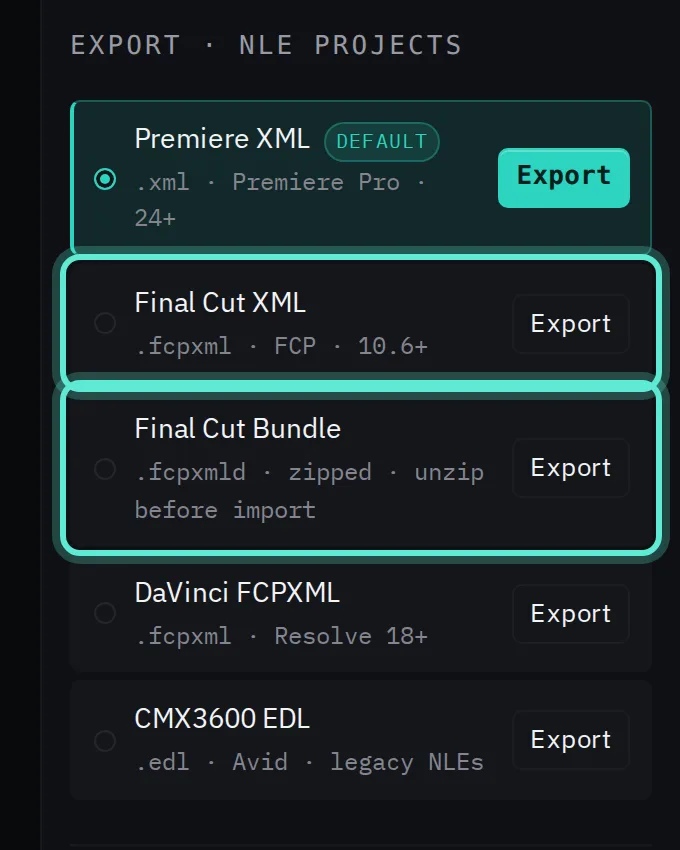
In Kutmo, after Detect, choose Final Cut XML (.fcpxml) or Final Cut Bundle (.fcpxmld). Both target Final Cut Pro 10.6 and later. The bundle arrives zipped: unzip it before importing. Leave the source video where it is.
2. Import the XML
In Final Cut, File → Import → XML and choose the file. Final Cut adds an event to your library with the project inside; open the project to see the timeline.
3. Relink if the media is offline
Browsers never tell a website where a file sits on your disk, so the timeline refers to the video by its name. If your editor reports the media as offline or asks where it is, point it at the original file once.
In Final Cut, select the clip in the browser, choose File → Relink Files, and locate the original video.
4. Read the timeline
- The primary storyline holds the parts Kutmo kept, end to end.
- The parts it would cut sit above as connected clips, each attached to a gap, so nothing is lost until you decide.
5. Make it a tight edit
Select a gap in the primary storyline and press Delete. The magnetic timeline closes the gap, and the cut part attached to it goes with it. Repeat for each gap you don't want to keep. To keep a cut part instead, drag it down into the storyline in place of its gap.
No need to review? Export a trimmed MP4 from Kutmo and import it as a single clip.
Common questions
Final Cut says the file is not valid. Check that you exported Final Cut XML or the bundle, not Premiere XML, and that a .fcpxmld bundle was unzipped first.
Can I bring several videos in at once? Yes. Drop several files into Kutmo; they are cut with the same settings, and the FCPXML lays them one after another in a single project.
Try it on your own video. Your first 2 runs need no account, and a free account adds 5 more.