A timeline file describes an edit (which part of which clip goes where) without containing any video. Your editor reads it and rebuilds the edit from the original footage, so nothing is re-encoded and nothing loses quality. The catch is that each editor reads its own formats. Here is which one to pick.
The short answer
| You edit in | Export | File |
|---|---|---|
| Premiere Pro 24+ | Premiere XML | .xml |
| DaVinci Resolve 18+ | DaVinci FCPXML | .fcpxml |
| Final Cut Pro 10.6+ | FCPXML, or the FCPXML bundle | .fcpxml / .fcpxmld |
| Avid Media Composer, older or other editors | CMX3600 EDL | .edl |
| No editor, or sending to someone else | Trimmed MP4 | .mp4 |
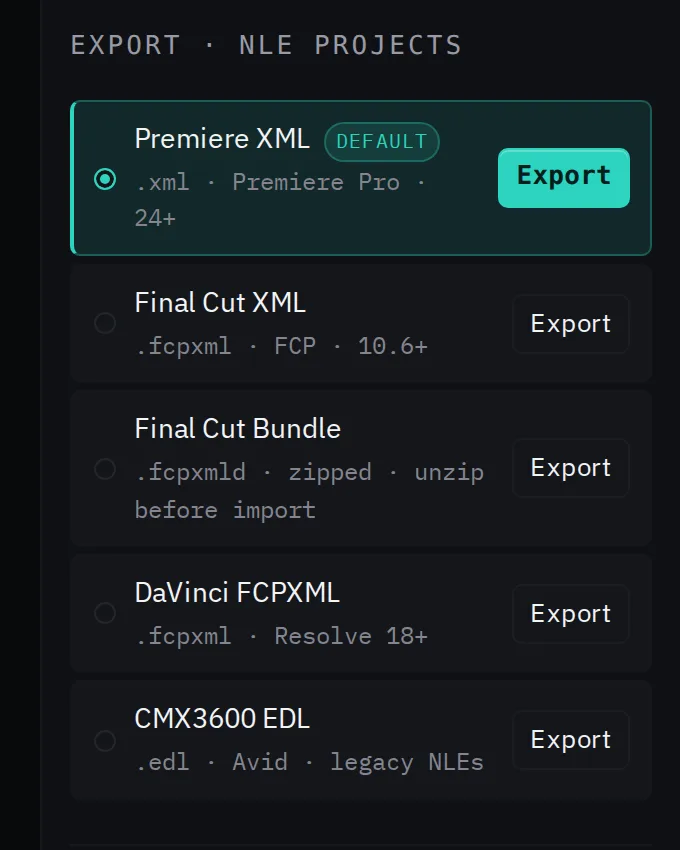
Premiere XML (.xml)
The XML format Final Cut Pro 7 introduced, also called xmeml. Final Cut 7 is long gone, but Premiere Pro still imports this format, which makes it the most reliable way to hand Premiere a finished sequence. It carries multiple video and audio tracks, clip names, frame rates and links between picture and sound.
Kutmo's Premiere XML is a full-length sequence: the kept parts on one track, the cut parts on another, with their audio linked. You review every cut in Premiere before anything is deleted.
Import: File → Import, then choose the .xml. Details: import into Premiere Pro.
FCPXML (.fcpxml) and the bundle (.fcpxmld)
Apple's format for Final Cut Pro (10 and later). DaVinci Resolve imports it too, which is why Kutmo's "DaVinci FCPXML" is an FCPXML file. Kutmo writes FCPXML 1.8: the kept parts in the main storyline and the cut parts as connected clips above gaps.
The .fcpxmld bundle is the same content packaged the way newer Final Cut versions save it. Kutmo delivers it zipped; unzip it before importing.
Import: in Final Cut, File → Import → XML. In Resolve, File → Import → Timeline. Details: Final Cut Pro, DaVinci Resolve.
CMX3600 EDL (.edl)
The edit decision list: a plain-text format from the days of tape editing, and still the one almost every editor can read. Each line is one event: the source in and out timecodes and where they land on the record timeline.
The price of that compatibility is detail. An EDL has one video track, no effects, and refers to footage by reel name rather than by file. Kutmo's EDL lists only the kept parts, joined end to end from 00:00:00:00, and uses drop-frame timecode at 29.97 and 59.94 fps. Because it names no file, bring the source video into your project first, then import the EDL and link it to that clip.
Trimmed MP4 (.mp4)
Not a timeline at all, but the finished video with the cut parts gone. Kutmo copies the original video instead of re-encoding it, so it is quick and loses no quality. The trade-off is that each cut moves to the nearest keyframe, which can shift it by up to about a second. Choose it when the person who needs the video has no editor.
If the editor says media is offline
Browsers never tell a website where a file sits on your disk, so Kutmo's XML files refer to the video by name. If your editor reports the clip as offline or asks where it is, point it at the original file once and the whole timeline links up.
Kutmo exports all five from one detection run, in your browser. Try it on your own video.
Related
- Remove silence from video automatically
- Kutmo docs: every mode, dial and export option